Review Comments (3) Screenshots (3) Questions & Answers (0) Votes (57) Awards (16) Wiki  
-Please log in to rate
4.2 4.2/5 (57)
-eHelp Corporation
-2.02
-www.ehelp.com
-Shareware
- 17 375 people
Download CamStudio

9.21 MBDownloaded 2764 times


Review

This is a quick review

CamStudio records screen activity from your Windows Desktop into standard AVI movie files. It is an ideal tool for developing videos to demonstrate features of a new software or any other task that requires the capture of desktop activity. The program is easy to use, and you can select an area or full desktop for recording. You can adjust the video quality settings to reduce file size, use custom cursors and add a soundtrack through your microphone or speakers. Furthermore, you can add screen captions to your desktop while recording. These captions are anti-aliased, high quality images that support text display in multiple languages. With the Video Annotation feature, you can also personalize your movie by including a webcam movie of yourself into the AVI.
 
The following full-length review applies to version 2.0

With CamStudio we can record all the things that happen in our PC desktop, we can see our favorite movies or capture and store a video from the internet.
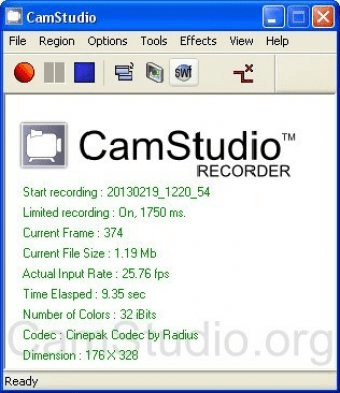
When we open the program we can see a Menu Bar and a window in the Cam Studio program, in the others icons we can see a Movie Player and a SWF Producer.

By means of the CamStudio menu bar we can record, stop and pause, another button (Region) allows us to select a region and change its values, or capture the Full Screen. We can change Video Options and we can configure the compress video time, we can choose the cursor Options, hide or show it, use actual cursor, the custom or use cursor for file. We can use a cursor highlight and select the shape circle, ellipse, square and rectangle, change their size and their color.

We can also choose whether to record the audio or not, to record the audio from a microphone or speakers, change the audio options (audio options for microphone, for speakers and audio and video synchronization).
We can enable Autopan and Autopan speed, record to flash and adjust keyboard shortcuts. The 'Tools' button takes us to the menu where we can add Screen Annotations, Video Annotations.
Advantages
  • Can see our favorite movies or capture and store a video from the internet.
  • Can use a cursor highlight and select the shape circle, ellipse, square and rectangle, change their size and their color.
Disadvantages
  • Has no disadvantages.

Reviewed by: Paula Ledesma

Reviewer rating: Editor's rating 4

Screenshots

Cam Studio Screen Cam Studio Screen Cam Studio2 Cam Studio2 Cam Studio Keyboard Cam Studio Keyboard

Latest comments

Guest #1347548(beginner) 11 months ago 
Hi there
I'm wanting help please on recording. Once I have recorded from a video and then replay it, it doesn't come out as clear as it plays on the pc. You get a ghost affect which causes a blurryness in the writing

thanks John
Guest #358373(beginner) Last year 
http://camstudio.org/

v2.5 beta 1
Guest #151362(beginner) Last year 
Ehelp doesn't exist any more, guys... they moved camstudio. Do a search for it.
Add new comment All 3 comments
Tag cloud
Download siClient

Email Address:

Password:

Register now »

Forgot password?

Copyright © 2009, Informer Technologies, Inc. About| Privacy and terms| Help| Feedback